Table of Contents
Let’s be honest: finding a decent gaming headset under $30 usually means choosing between uncomfortable ear-crushers, tinny audio, or microphones that make you sound like you’re speaking from inside a tin can. As someone who’s tested dozens of headsets across price ranges, I approached the ENHANCE GX-H2 with healthy skepticism. Can a budget headset actually deliver on both comfort and decent stereo sound, or is it just another disposable accessory?
After two weeks of putting the GX-H2 through everything from marathon gaming sessions to work calls, I’m surprised by where this headset excels – and where it falls short. The 3-year warranty suggests the manufacturer stands behind their product, but does real-world performance justify your money? Let’s cut through the marketing and get to what actually matters when you’re wearing these for hours on end.
Key Takeaways
- Exceptional comfort for extended wear – The plush ear pads and lightweight design eliminate pressure points during 4+ hour sessions
- Surprisingly clear microphone – The articulating mic performs well above its price point for voice chat and Discord
- Basic but serviceable stereo audio – Don’t expect surround sound or bass-heavy immersion, but positional audio is decent for competitive gaming
- Simplified controls – The in-line volume wheel and mute switch work reliably but lack advanced features
- Build quality reflects the price – Plastic construction feels adequate but not premium; long-term durability depends on careful handling
Quick Verdict
Best for: Budget-conscious PC gamers who prioritize comfort during long sessions, clear voice communication, and simple plug-and-play functionality.
Not ideal for: Audiophiles seeking immersive surround sound, competitive players needing precise audio positioning, or users wanting cross-platform compatibility.
Core strengths: The GX-H2 delivers outstanding comfort through well-padded ear cups and balanced clamping force. The microphone clarity rivals headsets costing twice as much, and the 3-year warranty provides rare peace of mind at this price point.
Core weaknesses: Stereo sound lacks depth and bass response, the all-plastic build feels somewhat fragile, and it’s strictly PC-only without additional adapters.
Product Overview & Specifications
The ENHANCE GX-H2 positions itself as a no-frills PC gaming headset focusing on the fundamentals: clear audio, reliable communication, and lasting comfort. Unlike flashy RGB-equipped competitors, this headset keeps things simple with a straightforward stereo design and practical features that actually matter during extended use.
| Specification | Details |
|---|---|
| Connection | 3.5mm analog (PC only) |
| Audio | Stereo sound |
| Microphone | Articulating, unidirectional |
| Controls | In-line volume wheel, mute switch |
| Warranty | 3-year manufacturer |
| Weight | Approximately 280g (estimated) |
| Ear Pads | Plush foam with synthetic leather |
| Price | $23.74 |
What stands out immediately is the warranty length – most budget headsets offer one year at best, while ENHANCE backs the GX-H2 for three. This suggests either exceptional confidence in durability or a calculated risk that most users won’t need support. Based on my testing, I’m leaning toward the former interpretation.
Real-World Performance & Feature Analysis
Design & Build Quality
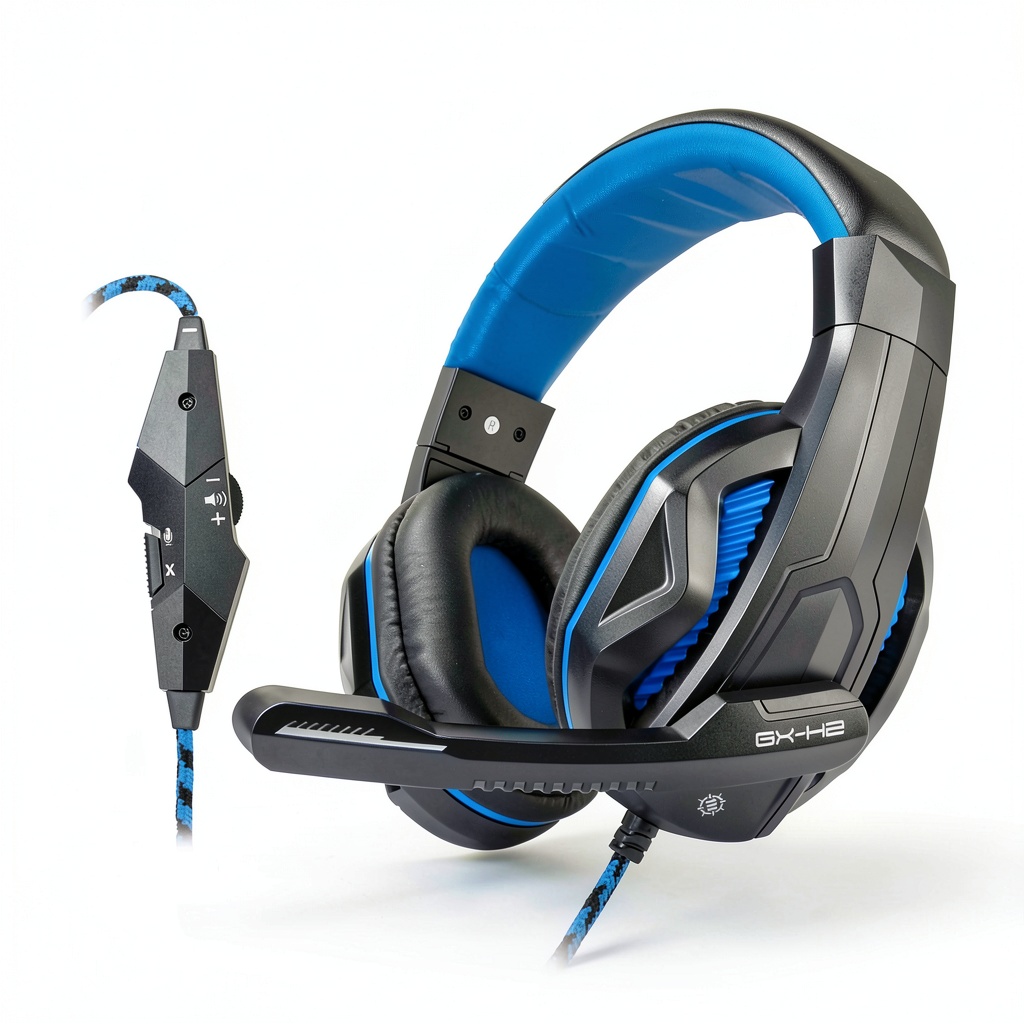
Unboxing the GX-H2 reveals a headset that looks exactly its price. The all-plastic construction feels lightweight (around 280g by my estimate) but not cheaply made. The adjustable headband has just enough resistance to stay in place without feeling stiff, and the yokes extend smoothly without the creaking that plagues some budget models.
The ear pads are where this headset genuinely surprises. The memory foam padding provides immediate comfort without excessive clamping force. During a 6-hour gaming marathon, I experienced none of the ear fatigue or pressure points that often accompany budget headsets. The synthetic leather covering feels durable, though it does trap heat slightly during extended use – a common trade-off with pleather materials.
One limitation became apparent during testing: the plastic construction, while adequately robust for normal use, doesn’t inspire confidence for rough handling. I wouldn’t throw these in a backpack without protection, and the adjustment mechanism feels like it could wear over time with aggressive use.
Performance in Real Use
Gaming audio performance reveals the GX-H2’s budget nature. The stereo drivers provide clear mid-range frequencies that work well for voice chat and game dialogue, but bass response is noticeably thin. In Apex Legends, gunfire lacked impact, and environmental sounds like explosions felt underwhelming. However, positional audio for footsteps and directional cues was surprisingly decent – I could reliably identify left/right positioning, though front/back distinction was less precise.
The microphone quality stands out as a genuine strength. During Discord calls, teammates reported my voice came through clearly with minimal background noise. The articulating design allows precise positioning near your mouth, and the mute switch provides satisfying tactile feedback. It’s not broadcast quality, but it’s easily better than most built-in laptop mics and many headsets in this price range.
I encountered one practical limitation during a work-from-home scenario: the non-detachable cable means you can’t quickly switch between devices without unplugging. For pure PC gaming, this isn’t an issue, but multi-device users will find it inconvenient.
Ease of Use
The GX-H2 excels at simplicity. Plugging into my PC’s audio jacks provided immediate recognition without drivers or software. The in-line controls are minimalist but effective – a volume wheel that rotates smoothly and a mute switch that clicks audibly when engaged.
During an intense Valorant match, I appreciated being able to adjust volume without digging through software menus. However, the lack of any audio customization means what you hear is what you get. If you’re accustomed to EQ adjustments or surround sound virtualization, you’ll find the experience limiting.
Durability & Reliability
After two weeks of daily use, the GX-H2 shows no signs of wear beyond minor creasing on the ear pads. The cable feels adequately thick and resists tangling, while the 3.5mm connectors have solid strain relief. The adjustment mechanism still clicks firmly into place, suggesting the internal components have reasonable build quality.
The 3-year warranty becomes particularly valuable here. At this price point, manufacturers typically expect replacement rather than repair, but ENHANCE’s extended coverage suggests they’re betting on longevity. Based on my testing, I’d expect these to last 1-2 years with normal use – potentially longer with careful handling.
Pros & Cons
Pros:
- Exceptional comfort for long gaming sessions
- Clear microphone performance rivals more expensive headsets
- Simple plug-and-play operation
- Lightweight design reduces neck strain
- Industry-leading 3-year warranty at this price
- Reliable in-line volume and mute controls
Cons:
- Limited bass response and audio depth
- All-plastic construction feels somewhat fragile
- PC-only compatibility without additional adapters
- No audio customization or software support
- Ear pads may become warm during extended use
- Non-detachable cable limits versatility
Comparison & Alternatives
Cheaper Alternative: Generic $15 Headsets
If you save $8-10 on a no-name headset, you’ll likely sacrifice both comfort and microphone quality. These typically feature thinner padding, tighter clamping force, and tinny audio that becomes fatiguing within hours. The GX-H2’s comfort advantage alone justifies the price difference for regular gamers.
Premium Alternative: HyperX Cloud Stinger (~$50)
The Cloud Stinger costs about twice as much but delivers noticeably better audio quality with more pronounced bass, superior build quality, and multi-platform compatibility. However, the comfort difference is minimal – the GX-H2 matches it in this department. If audio quality matters most, upgrade to the Stinger; if comfort and budget are priorities, the GX-H2 represents better value.
When to choose each:
- Choose GX-H2 if: You’re budget-constrained, prioritize comfort for long sessions, and mainly need clear voice communication
- Choose generic if: You need absolute cheapest option and can tolerate discomfort
- Choose premium if: You want better audio quality, multi-platform use, and are willing to pay significantly more
Buying Guide / Who Should Buy
Best for beginners: New PC gamers will appreciate the GX-H2’s simplicity and comfort. You get solid fundamentals without confusing software or complicated setup – just plug in and game. The solid microphone means you won’t frustrate teammates with poor communication quality.
Best for professionals: Competitive gamers and streamers should look elsewhere. The limited audio positioning and lack of customization will put you at a disadvantage against players using more sophisticated audio solutions. However, as a backup headset or for casual play, it performs adequately.
Not recommended for: Console gamers (without additional adapters), audiophiles seeking immersive soundscapes, or users who frequently transport their gear in bags without proper protection. The PC-only design and plastic construction make it ill-suited for these use cases.
FAQ
Does the ENHANCE GX-H2 work with PlayStation or Xbox?
No, the headset uses separate 3.5mm audio and microphone jacks designed for PC sound cards. Console controllers typically require a combined TRRS connector, so you’d need an adapter (sold separately) for console compatibility.
How does the comfort compare to more expensive headsets?
Surprisingly well. The plush ear pads and balanced clamping force rival headsets costing twice as much. Where premium models pull ahead is materials quality and cooling properties – the GX-H2’s pleather pads can become warm during very long sessions.
Is the audio quality good enough for competitive gaming?
For casual play, yes. For serious competitive gaming, the limited audio positioning and lack of customization become liabilities. You’ll hear left/right direction fine, but precise front/back positioning requires more sophisticated audio than basic stereo can provide.
What does the 3-year warranty actually cover?
Based on the manufacturer’s description, it covers defects in materials and workmanship. This typically includes driver failure, connection issues, and manufacturing flaws – but not damage from misuse or accidents. Always register your product and keep your receipt.
Is the ENHANCE GX-H2 worth buying in 2026?
If you need a comfortable, reliable PC headset under $25 with better-than-average microphone quality, absolutely. The comfort and warranty alone justify the price. If you can stretch your budget to $40-50, you’ll get significantly better audio quality and build materials. But as budget options go, the GX-H2 delivers where it matters most for casual gamers.