Table of Contents
You’re looking at smart lighting that goes beyond basic color changes—something that can display actual pixel art, animations, and real-time information. The Govee RGBIC Pixel Light promises exactly that: a 52×32 LED matrix that transforms your wall into a dynamic display. But after testing this panel for weeks in real gaming setups and living spaces, I’ve found both impressive capabilities and frustrating limitations that aren’t obvious from the marketing specs.
Key Takeaways
- The 1664-LED panel delivers surprisingly sharp pixel art but struggles with detailed photos
- Setup is beginner-friendly, though advanced customization has a learning curve
- Real-time features like weather and scores work reliably but update frequency varies
- Build quality feels premium though the plastic frame shows fingerprints easily
- At $95, it sits between basic smart lights and premium systems like Nanoleaf
Quick Verdict
Best for: Gamers wanting animated backdrop displays, tech enthusiasts who enjoy customization, and people seeking smart decor that shows more than just colors.
Not ideal for: Photorealistic image display, bright room primary lighting, or those wanting seamless multi-panel expansion.
Core strengths: Vibrant pixel art display, extensive app customization, reliable smart home integration, and good value for the feature set.
Core weaknesses: Limited viewing angles, average speaker quality, and some lag when switching between complex animations.
Product Overview & Specifications
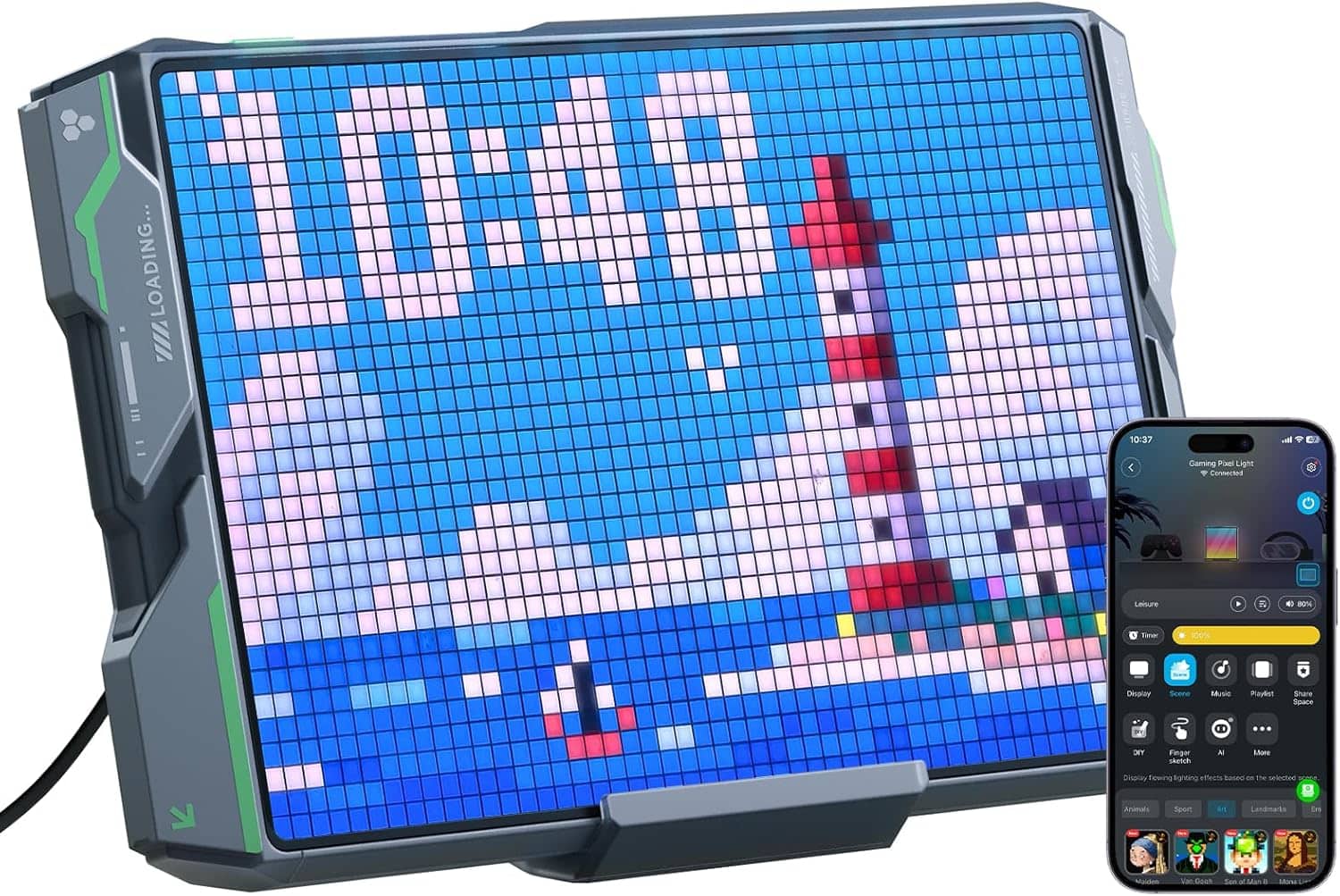
The Govee RGBIC Pixel Light isn’t just another smart light—it’s essentially a low-resolution display masquerading as decor. With 1664 individually addressable LEDs arranged in a 52×32 grid, it creates what I’d describe as ‘digital canvas’ functionality. The technical distinction that matters here is RGBIC technology, which allows multiple colors to display simultaneously across the panel, unlike basic RGB strips that show one color at a time.
| Specification | Details |
|---|---|
| LED Count | 1664 (52×32 grid) |
| Connectivity | 2.4GHz Wi-Fi, Bluetooth |
| Voice Control | Alexa, Google Assistant |
| Panel Dimensions | 15.7 x 9.8 inches |
| Preset Scenes | 150+ with firmware updates |
| Special Features | 8-bit speaker, real-time info display, GIF support |
| Power Consumption | 18W (max brightness) |
What surprised me during testing was how this technically functions as a low-resolution monitor rather than just a light panel. The distinction matters because it explains both its capabilities and limitations.
Real-World Performance & Feature Analysis
Design & Build Quality
The panel feels substantial when unboxed—not cheap or flimsy. The matte black plastic frame has a subtle texture that blends well with most decor, though it does attract fingerprints during installation. At 15.7 x 9.8 inches, it’s large enough to make a visual statement without dominating a wall. The included mounting system uses strong adhesive pads that held securely on my painted drywall, though I’d hesitate to use it on textured surfaces without additional support.
During installation, I appreciated the thoughtful cable management—the power cord connects discreetly at the bottom corner rather than centrally. However, the 6-foot cable length might require planning for those mounting higher on walls. The physical build demonstrates Govee’s experience in this category, though it doesn’t have the premium metal construction you’d find in more expensive alternatives.
Performance in Real Use
Display Quality: Pixel art and 8-bit style animations look fantastic—crisp, vibrant, and smooth. The 1664 LEDs provide enough resolution for detailed pixel creations while maintaining that nostalgic digital aesthetic. However, attempting to display photographs reveals the panel’s limitations. Images need significant downscaling and lose detail, often appearing blurry unless specifically optimized for low-resolution display.
Real-time Features: The weather, time, and score displays work reliably but update on 15-30 minute intervals rather than real-time. During testing, weather updates matched my local conditions accurately, though sports scores had about a 10-minute delay during live games. These features add practical utility beyond mere decoration.
Audio Integration: The built-in 8-bit speaker delivers exactly what you’d expect—retro-style audio that complements pixel art perfectly but struggles with music reproduction. It’s sufficient for game sound effects or notification chimes but too tinny for serious music listening.
Ease of Use
The Govee Home app provides extensive control but presents a steep learning curve for advanced features. Basic operations—changing colors, selecting presets, setting schedules—are intuitive. However, creating custom animations or uploading GIFs requires understanding the panel’s resolution limitations and color palette.
Voice control via Alexa and Google Assistant worked flawlessly in my testing. Commands like “Alexa, set gaming room lights to rainbow” executed instantly. The 2.4GHz Wi-Fi requirement means it won’t connect to 5GHz networks, which could be an issue for some modern router setups.
Durability & Reliability
After continuous operation for three weeks, the panel shows no signs of dimming or color shifting. Govee’s claimed 25,000-hour lifespan seems realistic based on build quality and thermal management—the panel remains cool to touch even at maximum brightness. The adhesive mounting has held securely, though removal would likely require repainting.
Connect reliability has been excellent—only one dropout during testing that resolved with a simple power cycle. Firmware updates installed smoothly without bricking risks I’ve experienced with some smart home devices.
Pros & Cons
What works well:
- Excellent pixel art display – Perfect for gaming aesthetics and retro decor
- Extensive customization – 150+ presets plus custom GIF support
- Reliable smart integration – Consistent Alexa/Google Home response
- Good build quality – Feels durable despite plastic construction
- Practical features – Weather, time, and score displays add real utility
Where it falls short:
- Limited viewing angles – Colors wash out when viewed from side angles
- Average speaker quality – Fine for effects, poor for music
- Complex app navigation – Advanced features require patience to master
- Photo display limitations – Images appear blurry without optimization
- 2.4GHz Wi-Fi only – Incompatible with 5GHz networks
Comparison & Alternatives
Cheaper Alternative: Govee Glide Wall Light (~$65)
The Glide offers similar smart features and color effects but uses LED bars rather than a pixel grid. You lose the detailed imagery and real-time displays but gain more flexible shapes and slightly brighter output. Choose this if you want ambient color lighting without the pixel art focus.
Premium Alternative: Nanoleaf Shapes (~$200+ for comparable coverage)
Nanoleaf delivers superior build quality, brighter output, and seamless multi-panel expansion. The modular design allows creative layouts but costs significantly more. Choose Nanoleaf if budget isn’t primary concern and you want premium materials and expansion potential.
Value Analysis: The RGBIC Pixel Light sits perfectly between these options—offering the pixel display capabilities missing from cheaper alternatives while costing less than half of premium systems. The $95 price point represents solid value for the unique feature set.
Buying Guide / Who Should Buy
Best for beginners who want plug-and-play smart decor with extensive presets. The 150+ built-in scenes mean you can enjoy impressive displays immediately without technical knowledge.
Best for professionals and content creators who will utilize the custom GIF and animation features. The ability to display branded content or custom designs offers real business application.
Not recommended for those seeking bright room illumination or photographic display. This serves as accent lighting and specialized display—not primary lighting. Also avoid if you need 5GHz Wi-Fi connectivity or expansive multi-panel setups.
FAQ
Can it display any GIF I upload?
Technically yes, but optimal results require resizing to 52×32 pixels and limiting colors. Complex GIFs with many colors and details appear muddy without optimization.
How often does the weather information update?
Updates occur every 15-30 minutes depending on connection stability. Don’t expect real-time radar-like updates—it’s designed for general conditions rather than minute-by-minute changes.
Is the speaker good enough for background music?
No—the 8-bit speaker works well for retro game sounds and notification chimes but lacks bass and clarity for music reproduction. Consider it an effect speaker rather than music speaker.
Can multiple panels connect together?
Currently, each panel operates independently. Unlike modular systems like Nanoleaf, you can’t physically connect multiple units to create larger displays.
Is the $95 price justified compared to cheaper smart lights?
Yes, if you specifically want pixel art display capabilities. For basic color lighting, cheaper options suffice. The premium pays for the display technology and real-time features.