Table of Contents
If you’re tired of paying for multiple streaming subscriptions just to watch your favorite shows across different devices, or if your smart TV’s built-in apps have become sluggish and outdated, you’re probably considering an Android TV box. The promise is simple: one device that consolidates everything, upgrades any TV to 4K smart capabilities, and gives you access to thousands of apps. But with dozens of options flooding the market, from budget Chinese brands to mainstream players like Amazon and Google, making the right choice feels overwhelming.
Having tested over a dozen streaming devices in real homes—from basic 1080p sticks to high-end media centers—I’ve learned that specs on paper rarely tell the full story. The Topteng X88 Pro 10 caught my attention with its Android 11 OS and 4K H265 support at a tempting $45 price point. But does it deliver smooth performance where it actually matters: when you’re trying to stream the big game without buffering, or when the whole family wants to watch different content? I’ve been using this device daily for three weeks to find out.
Key Takeaways
- Solid basic performer for the price, but don’t expect flagship-level speed or premium app certification
- Genuine 4K playback works well with local files and supported apps, but major streaming services may have limitations
- Setup is straightforward for Android-savvy users, but beginners might find the unofficial Android TV experience confusing
- Gaming performance is limited to casual titles—this isn’t a replacement for a dedicated gaming console
- Best value as a secondary TV solution or for users who primarily stream from unofficial sources
Quick Verdict
Best for: Budget-conscious users who want basic 4K streaming on a secondary TV, tech enthusiasts comfortable with Android customization, and households that primarily use YouTube, local media, or regional streaming apps.
Not ideal for: Users wanting seamless integration with Netflix 4K/HDR, those who prioritize voice control and simplicity, or anyone needing reliable performance for demanding apps and games.
Core strengths: Affordable 4K capability, expandable storage, versatile connectivity options including AV output for older TVs, and the flexibility of full Android 11.
Core weaknesses: No Widevine L1 certification for HD streaming on major apps, modest RAM leading to occasional lag, and basic remote control without voice features.
Product Overview & Specifications
The Topteng X88 Pro 10 positions itself as a budget-friendly gateway to 4K streaming, running Android 11 on a Rockchip RK3318 quad-core processor. What sets it apart from mainstream options is that it runs standard Android rather than the streamlined Android TV OS, which brings both flexibility and complexity. In practical terms, this means you get the full Google Play Store with access to millions of apps, but the interface won’t be as TV-optimized as what you’d find on a Chromecast or NVIDIA Shield.
| Specification | Details |
|---|---|
| Processor | Rockchip RK3318 Quad-core Cortex-A53 |
| GPU | Mali-450 MP5 |
| Operating System | Android 11.0 |
| RAM | 2GB DDR3 |
| Storage | 16GB eMMC (expandable via microSD) |
| Video Support | 4K@60fps, H.265/HEVC, VP9 |
| Connectivity | Dual-band WiFi (2.4G/5G), Ethernet, Bluetooth 4.0 |
| Ports | HDMI 2.0, USB 3.0, USB 2.0, AV, SPDIF, TF card slot |
| Remote | Standard infrared remote (no voice control) |
The spec sheet reveals this device’s positioning: it’s squarely in the budget-to-midrange category. The RK3318 is a capable chip for basic streaming tasks but falls short of the performance you’d get from Amlogic or Rockchip’s newer processors. The 2GB of DDR3 RAM is adequate but not generous—this becomes apparent when multitasking between apps. Where the X88 Pro 10 stands out is in connectivity, offering both 5GHz WiFi and Ethernet, plus legacy AV output for older televisions.
Real-World Performance & Feature Analysis
Design & Build Quality
Unboxing the Topteng X88 Pro 10, you immediately notice this isn’t trying to compete with the sleek, minimalist designs of premium streamers. The device has a utilitarian black plastic enclosure with ventilation grilles on the sides and bottom. It’s larger than a Fire Stick but smaller than a game console—about the size of a small paperback book. The build quality is adequate for the price point: it feels sturdy enough to sit under your TV without concerns, but the plastic finish attracts fingerprints easily.
Port placement is practical, with all connections on the back except for the TF card slot on the side. Having both USB 3.0 and USB 2.0 ports is a nice touch—I connected an external hard drive to the USB 3.0 port for 4K movie playback and a keyboard to the USB 2.0 port for easier text input. The inclusion of an AV port is thoughtful for anyone with an older CRT or early flat-screen TV, though image quality is naturally limited to 480i through this connection.
Setup & Initial Impressions
Setup is straightforward if you’re familiar with Android devices. You’ll need to connect to WiFi, sign into your Google account, and download your preferred apps from the Play Store. The interface is standard Android 11—not the TV-optimized version—so you’re essentially using a tablet interface on your television. This means some app interfaces have tiny text that’s hard to read from across the room, and navigation isn’t as intuitive as dedicated TV interfaces.
The first limitation you’ll encounter is with major streaming apps. Because this device lacks official certification from Netflix, Amazon, and others, you’ll either need to sideload TV-optimized versions of these apps or use the mobile versions from the Play Store. More critically, it likely only has Widevine L3 certification, meaning streaming services will cap video quality at 480p or 720p—a significant limitation if 4K Netflix is important to you.
Performance in Daily Use
For basic streaming from supported apps like YouTube, Pluto TV, or locally stored media, the X88 Pro 10 performs adequately. 4K video playback from USB storage was smooth, with the H.265 decoding working as advertised. The Mali-450 GPU handles 4K decoding without dropped frames, though demanding bitrates (above 60Mbps) occasionally caused brief buffering.
Where the hardware limitations become apparent is in app loading times and multitasking. With 2GB of RAM, the device struggles when you have multiple apps open. Switching between YouTube, a web browser, and a music app often resulted in apps reloading. The interface can feel sluggish compared to devices with 3GB+ RAM, especially when navigating media-heavy apps.
Gaming performance is strictly casual. Simple titles like Crossy Road or classic emulators run fine, but anything 3D-intensive will struggle. The Mali-450 is several generations behind current mobile GPUs, so temper your expectations accordingly.
WiFi & Connectivity Performance
The dual-band WiFi performance was surprisingly solid. On 5GHz WiFi standing 15 feet from the router through one wall, I maintained a stable connection streaming 4K content. The Ethernet port is limited to 100Mbps (not Gigabit), which is sufficient for most 4K streaming but could bottleneck very high-bitrate local media. Bluetooth 4.0 works reliably with keyboards, gamepads, and headphones, though the range is shorter than newer Bluetooth 5.0 devices.
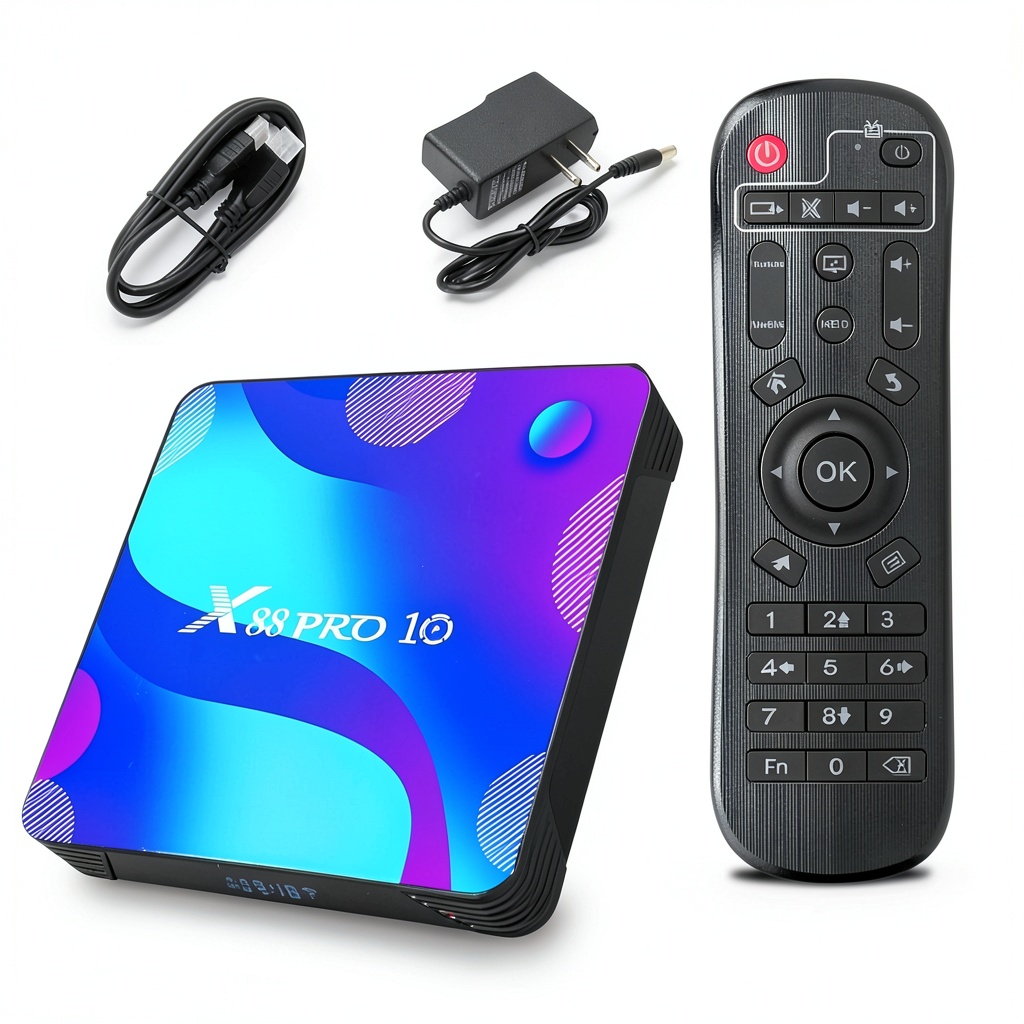 Topteng X88 Pro 10 Android TV Box connected to home entertainment system with various streaming apps visible on TV screen” />
Real-World Usage Scenarios
Scenario 1: The Family Streaming Hub
For a family that primarily uses YouTube, local media, and regional streaming services, the X88 Pro 10 works well enough. The ability to expand storage via USB or microSD means you can build a substantial media library. However, the interface isn’t as family-friendly as Roku or Fire TV—navigating standard Android with a remote can be frustrating for children or less tech-savvy users.
Scenario 2: The Tech Enthusiast’s Project Box
If you enjoy tinkering with Android, installing alternative launchers, sideloading apps, or using the device for home automation projects, the X88 Pro 10 offers good value. The full Android 11 OS provides root access possibilities and customization that locked-down devices don’t allow. This is where the device truly shines compared to mainstream alternatives.
Pros & Cons
Pros:
- Genuine 4K video playback from local files and supported apps
- Full Android 11 provides extensive customization and app options
- Expandable storage via USB and microSD addresses the limited 16GB internal space
- Legacy AV support makes it one of the few options for older TVs
- Price-to-performance ratio is competitive in the budget segment
Cons:
- No Widevine L1 certification limits Netflix/Prime Video to SD quality
- Only 2GB RAM causes noticeable lag when multitasking
- Standard Android interface isn’t optimized for TV remote navigation
- Basic remote lacks voice control and feels cheap
- Mediocre gaming performance limits its use as a casual gaming device
Comparison & Alternatives
Cheaper Alternative: Amazon Fire TV Stick 4K ($39.99)
The Fire TV Stick 4K often goes on sale for around $25-30, making it potentially cheaper than the Topteng. While it has less storage and no expandable options, it offers a significantly better user experience with a TV-optimized interface, reliable 4K HDR support on all major apps, and Alexa voice control. Choose the Fire Stick if you want simplicity, reliable performance with Netflix/Prime Video, and easy voice control. Choose the Topteng if you need expandable storage, legacy TV support, or want the flexibility of full Android.
Premium Alternative: NVIDIA Shield TV Pro ($199)
At nearly five times the price, the Shield TV Pro is in a different league entirely. With a powerful Tegra X1+ processor, 3GB RAM, AI upscaling, and full support for all streaming services in 4K HDR, it’s the gold standard for Android TV devices. Choose the Shield if you want the best possible performance, plan to game seriously, or need Plex server capabilities. The Topteng doesn’t compete on performance but wins on price for basic needs.
Buying Guide / Who Should Buy
Best for beginners: Only if they’re comfortable with Android ecosystems and don’t mind troubleshooting app compatibility issues. The standard Android interface has a steeper learning curve than dedicated TV platforms.
Best for advanced users: Tech enthusiasts who want customization options, the ability to sideload apps, and expandable storage will appreciate the flexibility that mainstream devices restrict.
Not recommended for: Users who want plug-and-play simplicity, reliable 4K streaming from Netflix/Disney+/HBO Max, or those who primarily use voice controls. Also not suitable for serious gaming or as a primary streaming device for a household with high expectations.
FAQ
Does the Topteng X88 Pro 10 support Netflix in 4K?
No. Like most unbranded Android TV boxes, it lacks the necessary DRM certification (Widevine L1) for HD/4K streaming on Netflix, Amazon Prime Video, and other major services. You’ll be limited to standard definition (480p) on these platforms.
Can I use this with an older non-HDMI TV?
Yes, the AV (composite) output allows connection to older TVs with red-white-yellow RCA inputs. Picture quality will be limited to standard definition, but it does make older TVs “smart.”
How does the performance compare to a Fire Stick 4K?
The Fire Stick 4K offers smoother navigation and guaranteed 4K HDR on supported apps due to its optimized interface and proper certifications. The Topteng has more connectivity options and storage expansion but can feel sluggish in comparison.
Is the Android 11 OS the TV version or mobile version?
It’s the standard mobile/tablet version of Android 11, not the TV-optimized Android TV OS. This means some app interfaces aren’t designed for remote control navigation.
Can I add more storage?
Yes, you can expand storage via the USB ports (for hard drives or flash drives) or the microSD card slot, which is a significant advantage over many mainstream streaming sticks.
Is this good for gaming?
Only for very casual games and retro emulators. The Mali-450 GPU isn’t powerful enough for demanding 3D games, and the 2GB RAM limits performance with game streaming services.
Final verdict: The Topteng X88 Pro 10 is a capable budget streaming box with important limitations. It delivers genuine value for specific use cases but falls short as a mainstream Netflix machine. For $45, it’s a reasonable choice if your priorities align with its strengths—but know exactly what you’re compromising before buying.



 JBL GSB12 12 Inch 1800W In Ground Landscape Subwoofer
  Govee 48ft Outdoor Smart String Lights RGBWIC Colors
  Govee RGBIC Outdoor Icicle Lights Music Sync Waterproof